



💡 Why Build a Currency Converter?
We’ve all been there — scrolling through flight deals or ordering something online and wondering: “How much is that in my currency?” Instead of Googling it every time, let’s build a lightweight currency converter app using Streamlit and Fixer.io API.
It’s quick, it’s useful, and it’s a fantastic intro project to:
- Calling external APIs
- Building a real-time UI with Streamlit
- Handling user input and API data
Ready? Let’s go. 🚀
🛠️ What You’ll Need
Before we dive in, make sure you’ve got the following:
🔧 Prerequisites:
- Python 3.x installed
- Streamlit installed (
pip install streamlit) - A free API key from Fixer.io
📦 Step 1: Install Required Packages
Open your terminal and run:
pip install streamlit requests
These are the only two packages we need — Streamlit for UI, and requests to fetch data from the API.
🔑 Step 2: Get Your API Key from Fixer.io
- Go to https://fixer.io
- Sign up for a free account
- Copy your API key from the dashboard
Replace the API key in the code below with your own. (Free plan works just fine for basic currency rates.)
🧠 Step 3: Set Up Your Script
Create a new file, e.g., currency_converter.py, and start by importing the essentials:
import streamlit as st
import requests
Then define your API endpoint:
API_KEY = "your_api_key_here"
URL = f"http://data.fixer.io/api/latest?access_key={API_KEY}"
🔄 Step 4: Fetch Exchange Rates
We’ll write a function to make a GET request to Fixer and return exchange rates:
def get_exchange_rates():
    response = requests.get(URL)
    if response.status_code == 200:
        data = response.json()
        if data.get("success"):
            return data["rates"]
        else:
            st.error("Error fetching exchange rates. Please check your API key.")
    else:
        st.error("Failed to fetch exchange rates.")
    return {}
If all goes well, you’ll get a dictionary of rates like {"USD": 1.12, "INR": 89.2, ...}.
🌍 Step 5: Create a Currency Name Map
Fixer only returns currency codes (e.g., USD, INR). For a better user experience, map them to readable names:
currency_names = {
    "USD": "US Dollar",
    "EUR": "Euro",
    "SAR": "Saudi Riyal",
    "INR": "Indian Rupee",
    "GBP": "British Pound",
    # ... include as many as needed
}
To keep things clean, only show codes that actually exist in the API response.
🧾 Step 6: Build the Streamlit UI
This is where the magic happens ✨
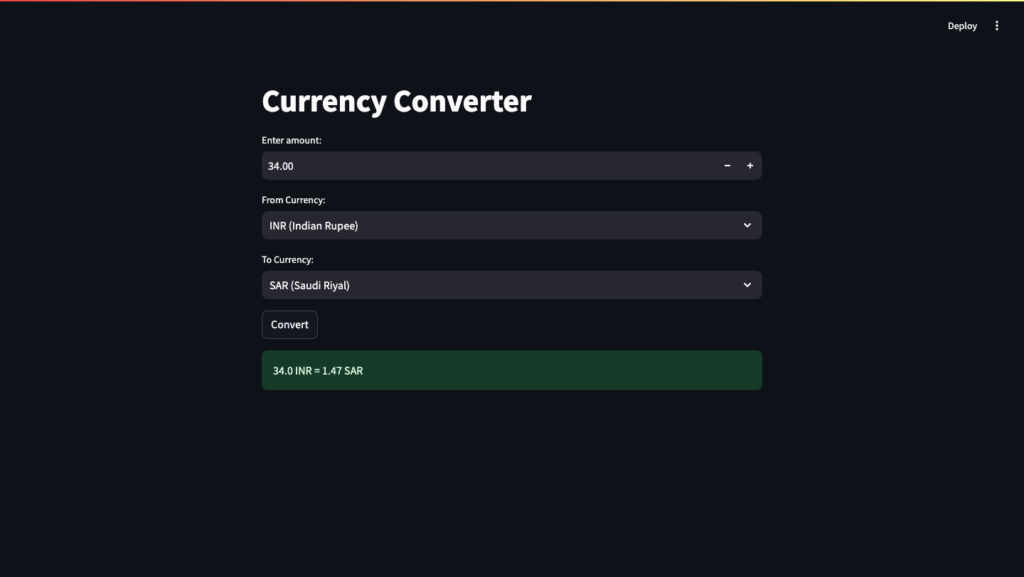
st.title("Currency Converter")

# User input
amount = st.number_input("Enter amount:", min_value=0.01, value=1.00, format="%.2f")

# Dynamic dropdowns
from_currency = st.selectbox("From Currency:", options=[f"{code} ({name})" for code, name in currency_names.items() if code in fx])
to_currency = st.selectbox("To Currency:", options=[f"{code} ({name})" for code, name in currency_names.items() if code in fx])
🔁 Step 7: Handle Conversion Logic
When the user hits the Convert button:
if st.button("Convert"):
    from_code = from_currency.split(" ")[0]
    to_code = to_currency.split(" ")[0]

    if from_code in fx and to_code in fx:
        converted_amount = round(amount * fx[to_code] / fx[from_code], 2)
        st.success(f"{amount} {from_code} = {converted_amount} {to_code}")
    else:
        st.error("Invalid currency selection. Please try again.")
This takes the input amount, fetches the correct conversion rate, and shows the result.
📷 (Optional) Step 8: Visual Polish
You can enhance the app further with:
- Icons or flags using images
- Charts showing historical trends (Fixer has historical data APIs too)
- Themes or dark mode (Streamlit has built-in theming)
🚀 Run the App
Open a terminal and run:
streamlit run currency_converter.py
🎉 And voilà — a fully working currency converter in your browser!
🧠 Wrap-Up
In this tutorial, we learned how to:
- Use Fixer.io API to fetch real-time exchange rates
- Build an interactive Streamlit UI
- Handle user input and show dynamic results
This is a great beginner project to learn APIs and Streamlit. Want to take it further? Try adding:
- Currency trend graphs
- Historical conversions
- Local caching to improve performance
🙋 FAQ
❓ Is Fixer.io free?
Yes! There’s a free tier with hourly updates for EUR base currency.
❓ Can I change the base currency?
Only with a paid plan — by default, Fixer.io returns rates based on EUR.
❓ Can I convert to/from cryptocurrencies?
Yes, Fixer supports some crypto like BTC, though updates may be less frequent.
💬 Your Turn!
Did you build this app? Got stuck somewhere or added cool features?
Drop a comment below, or reach out to us at Ossels AI if you want help building real-world AI or data apps like this one.
🔗 Also check out our other Python + AI tutorials here
